Odoo 14 Community ToDo List App
The majority of business corporations in the country operate in a pre-planned environment, with operations mostly dependent on plans and activities. Tasks that need to be completed or items that need to be done might be listed by organizations. Odoo, a dedicated business management solution, allows you to list and plan tasks via the To-Do List App, making your operations more efficient.
Odoo To-Do List app assists us in managing and scheduling tasks. We may use it to schedule general activities as well as activities that are scheduled via Odoo's sales, buy, inventory, and other modules.
The To-Do List application has the following features:
- Schedule general To-Do activities
- Recurrence on each activity
- Set a priority for each action.
- Based on the user, activities can be filtered.
We may schedule events such as general meetings and training sessions, and keep track of each minute of the meeting or session. Furthermore, you may schedule an activity to repeat itself on a daily, weekly, monthly, quarterly, or yearly basis, making it easier to coordinate and complete each assignment or activity. In addition, this feature improves the production and cooperation of any firm. Each task or activity should be scheduled and given a priority based on the amount of priority necessary. We can boost production and growth by configuring the priority levels as urgent, important, and ordinary.
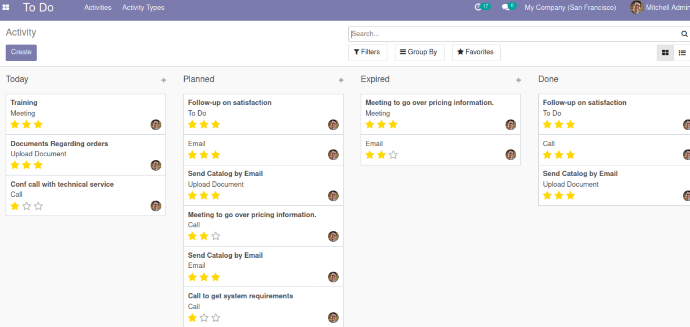
When a user first joins the module, they are presented with a kanban view based on the state of the scheduled activities. The states are Today, Planned, and Expired, depending on the due date/deadline. If the activity is finished, it is in the Done state; if it is canceled, it is in the Canceled state. In addition, the kanban view can display the activity's created person. Each action is shown in the kanban view with its activity type, priority level, and summary.
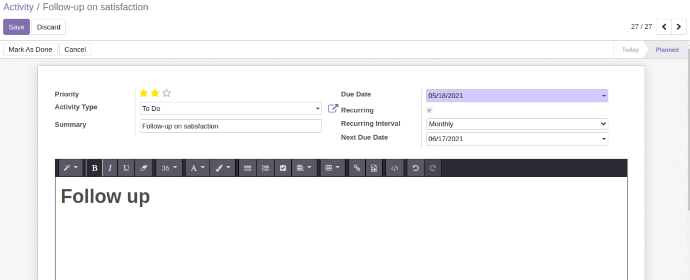
Let's have a look at the creative components of a new activity now. Priority is included in the Form View:
Each action should be given a priority.
Users can choose the type of activity that they require.
The model mail activity type has a Many2one field.
We can also develop new activity kinds depending on the existing activity types' specifications.
Summary: a new summary of the activity has been added.
Set a date for the activity's completion.
If we need to repeat this activity, we can set the Recurring field to True and choose the Recurring Interval; the Next Due Date will be automatically updated based on the interval and due date.
Because the Due Date for new records is dependent on scheduled actions, when the deadline expires, new records will be created automatically with the current Next Due Date.
Cancel: If you click this button, the action will be canceled.
When the activity is finished, click this button to mark it as done. The state of the action will change to Done.
If the activity is repeated, new records with the same details as the prior activity will be produced, with the Due Date and Next Due Date updated.
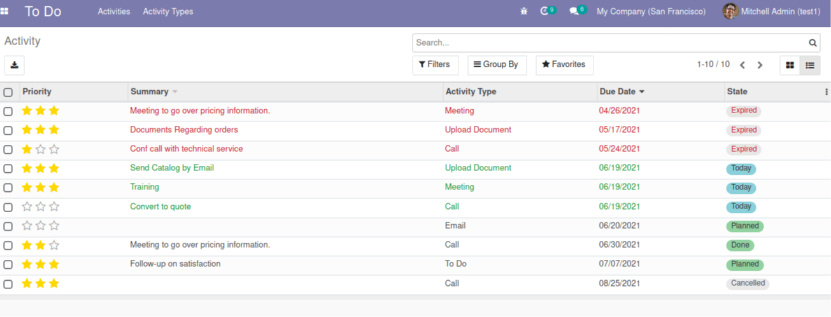
Tree View displays a list of all scheduled activities, highlighting those that have expired or are currently in progress. It color-codes actions at each level based on their deadlines: Expired, Planned, Today, Done, and Canceled. The List View provides a full description of the activities that are scheduled in general and per module. Late activities, Today activities, and Future activities are advanced filtering options that include filtering based on the due date.
Moreover, activities can be filtered based on the user, and activities can be categorized based on the Document model, status, and Treated Priority level. With these similar features, we can also plan actions from other modules such as sales, purchase, and inventory. Those planned activities are also visible in the tree view.